
How to Set Up the BedJetUpdated an hour ago
Setting up your BedJet is quick—no tools, drilling, or technical know-how required. This guide walks you from unboxing to your first perfect sleep, with tips for Cloud Sheet and Dual Zone setups.
What’s in the box
BedJet base unit
Air hose with nozzle
Adjustable mattress mount (paddle, height links, clamp)
Smart remote (batteries included) — unless you ordered “App-Only”
Instruction manual
For Dual Zone Systems (Queen, King, Split King):
Two BedJet 3 Mini base units (one per side)
One Cloud Sheet in the selected size (King Dual Zone) or two Twin XL Cloud Sheets (Split King)
Note for App-Only orders: control your BedJet with the BedJet Smart Remote App (iOS/Android). A physical remote is not included. The BedJet Smart Remote can be found by searching “BedJet” on your phone or tablet app store.
Before you start
Clearance: plan for ~6 in (≈15 cm) of height under the bed for the base unit.
Airflow: keep intake and exhaust areas unblocked. Avoid kinks in the hose.
Power: plug directly into a wall outlet. (For two units in one room, we recommend enabling Low Power on both to reduce circuit load.)
Placement: foot of the bed usually gives the most even airflow.
Step-by-step installation
Position the BedJet
Place the base unit under the bed or beside the bed near the foot. Ensure clear airflow to/from the unit. On adjustable bases, verify the frame won’t contact the BedJet through the full range of motion.
Attach the air hose
Push the hose onto the BedJet outlet until snug. Avoid sharp bends; a smooth curve maximizes airflow.
Assemble the mattress mount
Connect paddle → height links → clamp. Slide the paddle between the mattress and box spring/foundation/slats where the hose will enter the bed.
Tip: clamp to the fabric portion of the hose (not the plastic cuff) for a secure, full-height hold.
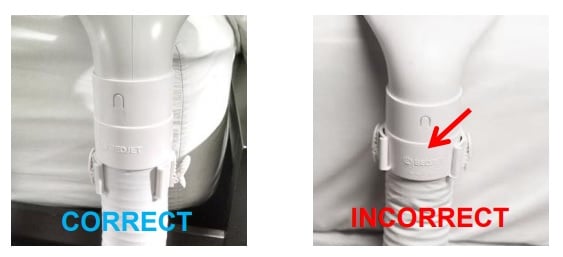
Place the nozzle (choose your bedding style)
Using Cloud Sheet: insert the nozzle into the Cloud Sheet inlet, then pull the inlet fabric down so it rests just below the hose clamp. Close any unused inlets for best performance.
Using standard sheets: place the nozzle between the top and fitted sheets near the foot. Use the clamp’s side clasps to hold bedding. With very thin sheets, fold a bit of fabric inside the clamp for extra grip.
Power on
Plug into a wall outlet. Press the BedJet power button to start. Status lights will briefly illuminate.
Set up control (remote or app)
Physical Smart Remote: insert the included batteries and follow on-screen prompts.
App-Only / App users: download “BedJet Smart Remote App” (iOS/Android), enable Bluetooth (and Location permissions), then follow in-app pairing. Click here to view our article on the BedJet Smart Remote App
First-night Tips
Cooling: start around mid fan speed; if air feels concentrated at your feet, reposition the nozzle or use a Cloud Sheet for even distribution.
Heating: for “fresh-from-the-dryer” warmth, pre-heat with Turbo Heat for up to 10 minutes when first getting in bed, then switch to a comfortable heat level.
Cloud Sheet: always place your normal blanket/duvet on top—some weight improves performance.
Need more help?
Watch: BedJet installation video (step-by-step visual)
Get support: [email protected] or +1 (401) 404-5250